
In chemistry and biochemistry, a dissociation constant (Kd) is an equilibrium constant that measures the tendency of a complex to dissociate reversibly into its components, such as when a complex falls apart into its component molecules, or when a salt splits up into its component ions. The dissociation constant is the inverse of the association constant, with a lower Kd indicating stronger binding affinity.
In a saturation binding experiment, you vary the concentration of radioligand (A) and measure total binding (B). The goal is to determine the Kd (ligand concentration that binds to half the receptor sites at equilibrium) and Bmax (maximum number of binding sites). Kd is calculated as:
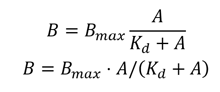
To implement the binding curve plot within CDD:
- Create readouts for input data such as concentration [A] and total binding [B]
- Creating a plot type readout to generate the curve fit
- Editing and saving the curve
Create a numerical readout for the X-axis values:
Create a numerical readout for the Y-axis
Create a plot readout for the Receptor Binding: One-Site Total Binding curve:
Our protocol now captures our input data and automatically generates a one-site total binding plot for each entity per run of the protocol.
The following parameters will automatically be calculated by CDD Vault for this plot type:
- Bmax
- Kd
- Maximum measured - Maximum extremal value of all measured responses
- Minimum measured - Minimum extremal value of all measured responses
- N - total number of data points used to perform the curve fit
- R squared
- AUC - area under curve in observed range
Area under the curve
- The CDD Vault AUC is calculated as the (positive area - negative area) under the dose response curve where:
- The curve is defined as straight line connections between responses, not the fitted curve (Linear Trapezoidal Non-uniform grid method)
- Units are response units * independent units
- The baseline is set at the negative control mean or 0 if control data is not available
Please note that all auto-calculated parameters listed above can be used in custom calculations as separate readouts. These parameters can be accessed within our robust formula editor.